KSML Application States
This reference lists the actions available on a KSML application, the states a KSML application can hold, and the mapping between the Kubernetes deployment status and the status shown on the Application card.
Type |
Reference |
Goal |
Look up the actions, states, and status conditions of a KSML application. |
Audience |
An Application owner who can start and stop a KSML application in Self-Service. |
When to use |
When you need to interpret the state shown on a KSML Application card or check which action a state allows. |
Available application actions
The following actions are available to the Application owner. Each action triggers a Helm operation on the Kubernetes cluster where the Instance’s configured Provisioner runs and affects a defined set of Kubernetes resources.
| Application action | Effect | Affected Kubernetes resources |
|---|---|---|
|
Deploys the KSML application on Kubernetes. Available in the |
|
|
Undeploys the KSML application on Kubernetes. Available in the |
|
State lifecycle
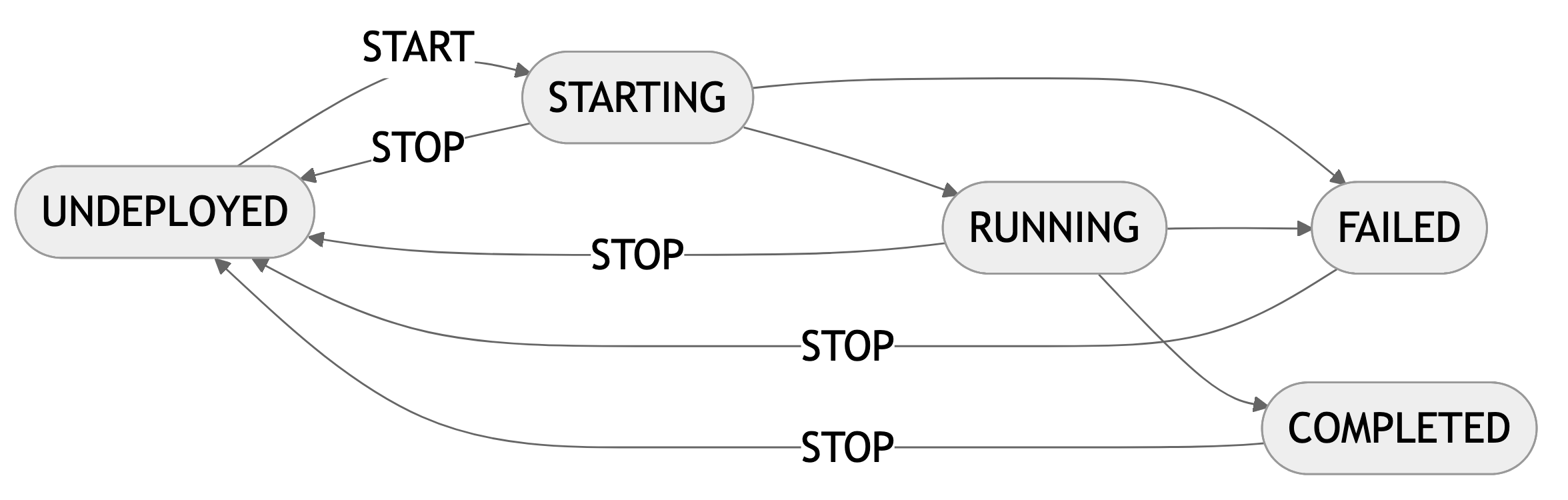
A KSML application transitions through states based on infrastructure status and user actions. The Platform Manager polls the status from Kubernetes and displays the current state on the Application card. The following table lists the transitions between states.
| From state | Trigger | To state |
|---|---|---|
|
|
|
|
The KSML status is |
|
|
The KSML status is |
|
|
The KSML status is |
|
|
|
|
The following diagram shows the same lifecycle.
Status mapping
Self-Service polls the provisioner for the status of the deployment while the Application Overview page is open. The status shown on the Application card is one of Undeployed, Starting, Running, Failed, or Completed. The conditions for each status depend on the Automatic Restart setting. The following table lists the KSML status and the condition for each combination.
| Setting | Status | KSML status | Condition |
|---|---|---|---|
On Exit |
|
(not deployed) |
The Helm release isn’t deployed. |
|
|
The StatefulSet doesn’t yet have all replicas ready, and the KSML container hasn’t failed. |
|
|
|
The StatefulSet has all replicas ready. |
|
|
|
The KSML container exited with a non-zero code, or is waiting for a reason other than initialising, for example |
|
Never |
|
(not deployed) |
The Helm release isn’t deployed. |
|
|
The Job has fewer ready pods than active pods. |
|
|
|
The Job has all active pods ready. |
|
|
|
The Job has no active pods and at least one failed pod. |
|
|
|
The Job has no active pods, no failed pods, and at least one succeeded pod. |
| Any other KSML status makes the Platform Manager status request fail with HTTP 502. The Application card then shows no status and no action, or keeps the last status it read. |