How to Prepare a Keycloak Realm for Federated Service Accounts
This guide shows you how to enable the federated client authenticator on a tenant’s Keycloak realm and configure the external identity provider so federated service accounts can authenticate.
Type |
How-to guide |
Goal |
Prepare a tenant realm so a federated service account can authenticate with an assertion signed by an external identity provider. |
Audience |
Platform operator with admin access to the tenant’s Keycloak realm, working with the external identity provider’s administrator. |
When to use |
Use this once per realm before a tenant admin creates a federated service account, or when the create screen reports federation unavailable. |
Tenant admins create the service account itself in Self-Service: see Federated Service Accounts.
Prerequisites
Federated authentication relies on trust between the external identity provider (IdP) and the tenant realm, so this setup touches both the Keycloak deployment and the realm’s IdP configuration.
- Access and permissions
-
-
Keycloak admin access to the tenant realm.
-
Access to change the Keycloak deployment configuration, to enable a feature flag.
-
The external IdP’s administrator, to supply the issuer, the JSON Web Key Set (JWKS) URL, and the audience identifier.
-
- Tools and versions
-
-
Keycloak 26.6 or later. The federated client authenticator is not available in earlier versions.
-
- Resources that must exist first
-
-
The tenant realm. Its name is the tenant short name.
-
An OpenID Connect (OIDC) identity provider registered in that realm for the tenant’s external IdP. See How to Create an SSO Realm in Keycloak.
-
For Microsoft Entra: a resource application whose object identifier (GUID) is used as the audience, and a workload identity (managed identity or app registration) for the consumer.
-
Values in angle brackets, such as <REALM>, are placeholders. Replace each with your own value.
|
Enable the federated client authenticator
The federated-jwt authenticator depends on the client-auth-federated feature. It is enabled by default on Keycloak 26.6.4 and later, so this is usually a check rather than a change. If the feature is not enabled, the authenticator is absent and the token exchange fails with a misleading client_not_found error.
-
Confirm the
client-auth-federatedfeature is enabled in the Keycloak deployment, for example under Enabled features on the admin console’s server info page, or in the feature list Keycloak logs at startup.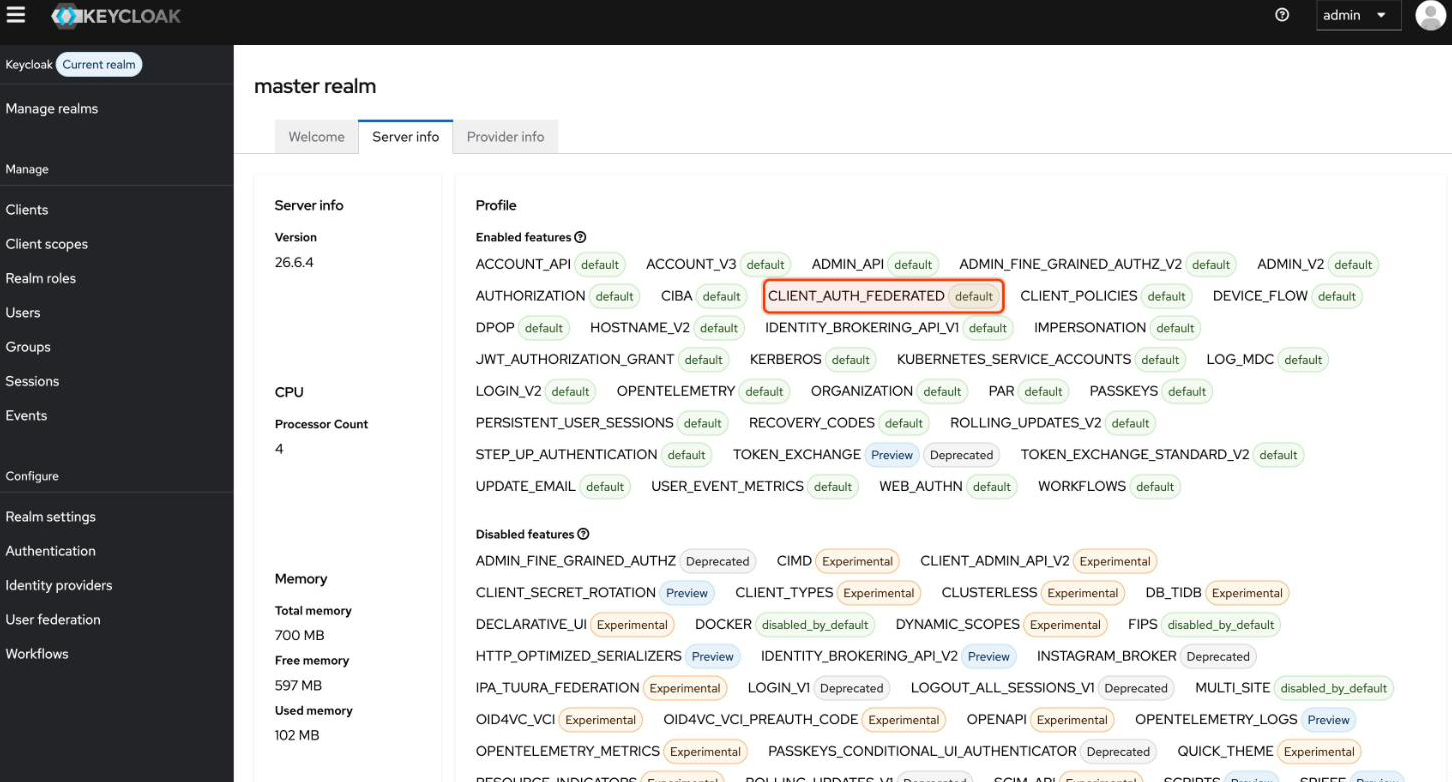
-
If it is not enabled, on an earlier version or a deployment with a custom feature set, add
client-auth-federatedtoKC_FEATURESthrough the chart’sextraEnvand restart Keycloak. See the Keycloak chart values reference.
| This is separate from the flow execution in the next step, which only realms upgraded from a version earlier than 26.6 are missing. |
Add the federated-jwt execution to the client-authentication flow
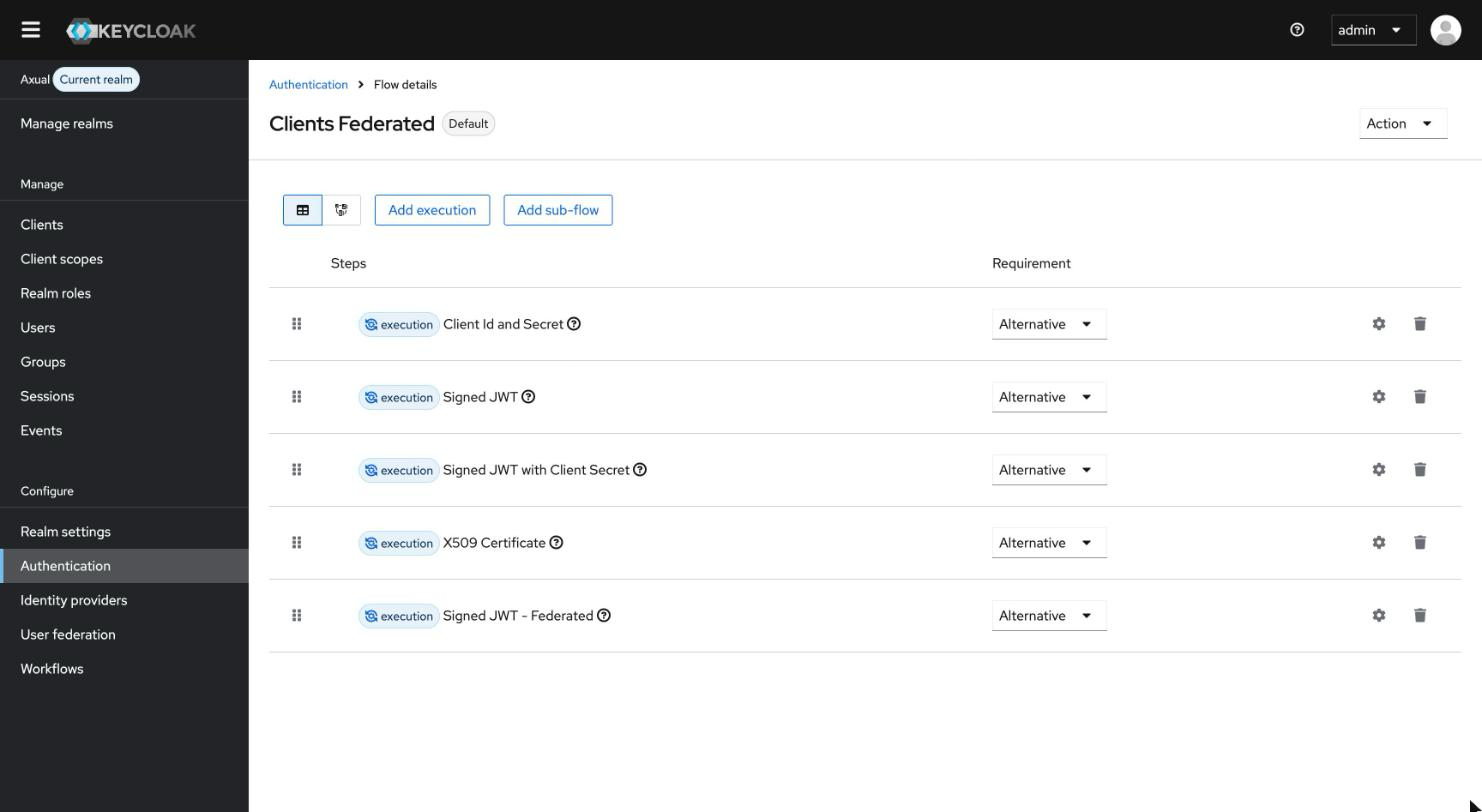
A realm that was upgraded from a Keycloak version earlier than 26.6 is missing the "Signed JWT - Federated" execution; a fresh 26.6 or later install already has it. The built-in flow cannot be edited in place, so add the execution to a copy and bind the copy.
-
In the Keycloak admin console, open the tenant realm.
-
Go to Authentication, then the Flows tab.
-
Duplicate the built-in clients flow.
-
On the copy, click Add step and add Signed JWT - Federated.
-
Set the new step’s requirement to Alternative.
-
Open the copy’s action menu, choose Bind flow, and bind it as the Client authentication flow.
This is additive. The four legacy client-authentication methods keep working.
The bound flow then lists the Signed JWT - Federated execution alongside them:
Configure the identity provider for client assertions
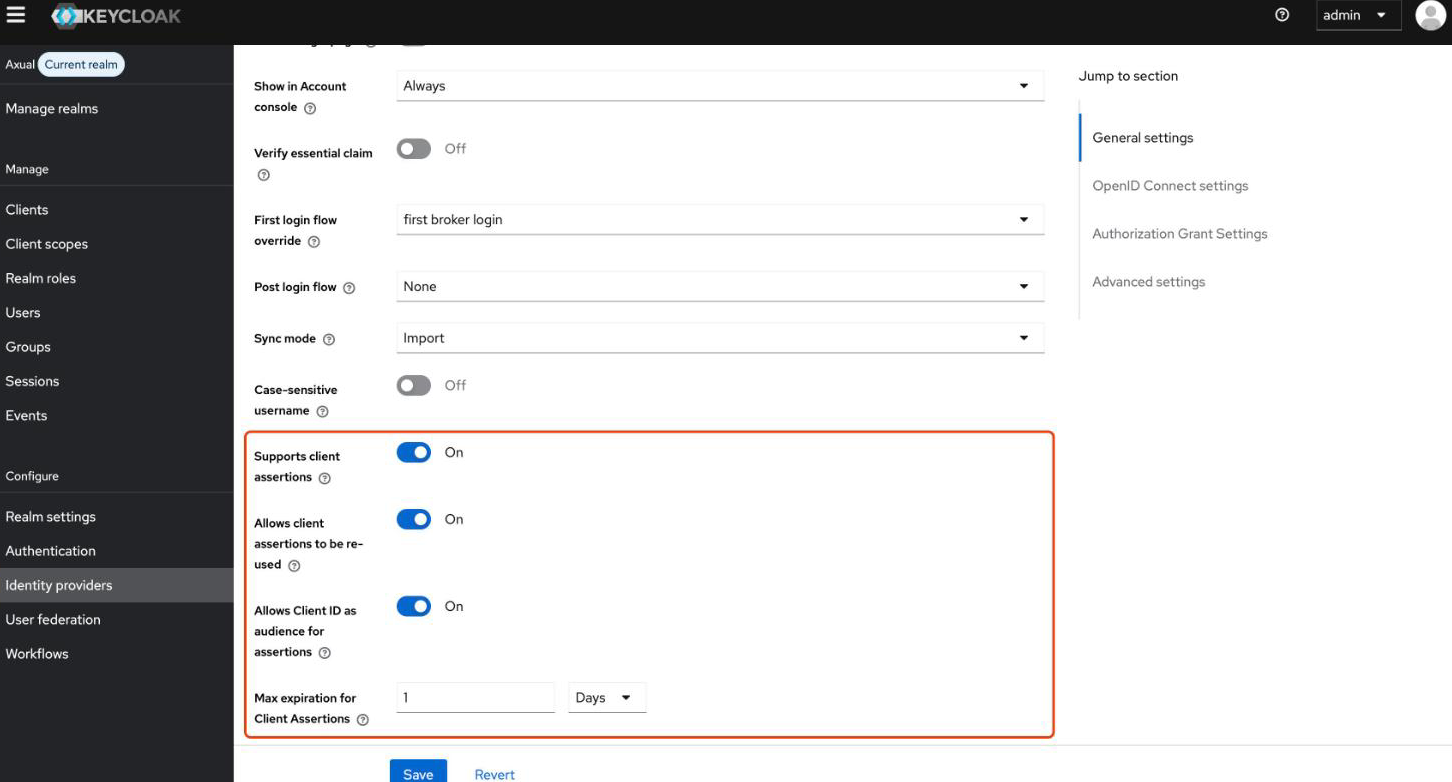
Configure the realm’s OIDC identity provider so Keycloak trusts the external IdP’s assertions and resolves the service-account client from them.
| Use an OIDC identity provider with client assertions enabled, not a JWT-authorization-grant provider. They are different features, and a JWT-authorization-grant provider can never satisfy federated client authentication. |
Set these keys on the identity provider. The example values are for Microsoft Entra.
| Key | Value |
|---|---|
|
The external IdP issuer, matched against the assertion’s |
|
|
|
The IdP’s JWKS endpoint. |
|
|
|
|
|
|
|
The audience the assertion must carry. Set it to the resource application GUID, |
|
|
|
|
In the admin console, these appear as toggles and fields on the identity provider’s Settings tab:
| One issuer per realm. Keycloak requires the issuer to be unique across a realm’s identity providers that support client assertions. |
Verify the realm accepts federated authentication
Confirm the setup before a tenant admin relies on it.
-
In the admin console, open Authentication, the Flows tab, and the bound client-authentication flow, and confirm it lists the Signed JWT - Federated execution.
-
Ask a tenant admin to open the create service account form and check that the Federated authentication method is offered, which means the realm’s federation options now report federation as supported.
To confirm the full exchange end to end, have the consumer obtain a token as described in Authenticating as a Service Account.