Distribution Between Kafka Clusters
This guide explains what the Axual Distributor keeps in step between Kafka clusters, the tree model and copy flags that get every record to every cluster exactly once, how consumer offsets are distributed by timestamp rather than by number, and where schema distribution differs from both.
Type |
Explanation |
Goal |
Understand the distribution model well enough to decide which clusters each level of your deployment targets. |
Audience |
Platform Operators and architects planning distribution for a multi-cluster instance. |
When to use |
Read before configuring an Axual Distributor, because the model fixes cluster names and levels that cannot be changed later without consequence. |
The Axual Distributor synchronises three things between the Kafka clusters of a tenant instance: the records on instance topics, the committed offsets of consumer groups, and, for the legacy schema registry only, the schemas topic. Each is handled by its own connector, and each has its own reason for existing.
- Message Distribution
-
A producer writes to a topic partition on one cluster, and Message Distribution puts those records on the same topic on every other cluster of the instance. Because the topic name is the same everywhere, a consumer reaches the records from whichever cluster it connects to, using nothing but the topic name.
- Offset Distribution
-
A consumer stores its position in Kafka so it can resume where it stopped. Offset Distribution copies those committed positions to the other clusters, which is what lets a consumer application move between clusters, from on-premises to cloud for example, without reprocessing weeks of records.
- Schema Distribution
-
A legacy component that copies the schemas topic of the Confluent-based legacy registry. It does not apply to Apicurio Registry, where one shared registry serves every cluster instead. See Schema Distribution.
Contents
The sections below cover each area of the subject, and then the pages that put it into practice:
How records reach every cluster
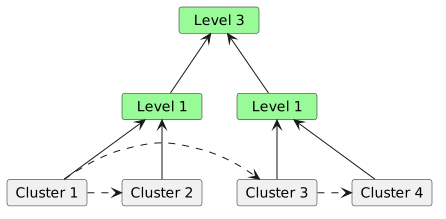
For efficiency, the Axual Distributor does not send messages from every cluster to every other cluster. It uses logical "levels" instead. Every cluster runs several distributor instances, one per level, and each one distributes to the other instances on its own level. The levels form a binary tree with the Kafka clusters as the leaf nodes. The root and intermediate nodes are conceptual only and match no physical component.
The example below has four Kafka clusters and a binary tree of two logical levels, numbered 3 and 1. The operator chooses those numbers, and the distribution algorithm below turns each one into the copy-flag mask the distributors on that level use.
Copy flags and the distribution algorithm
The distribution algorithm prevents distribution loops, so each message reaches each cluster once. Every message carries a custom header holding "copy flags", a bit mask whose bits record whether distribution already happened for each level. When a message arrives on a cluster, each distributor examines its own copy flag bit and all the lower order bits. If any of those bits is 1, the distributor treats distribution as done for its level and does not distribute again. A freshly produced message may carry no header at all, and its copy flags then count as all zeroes.
A distributor targets either a single cluster or a subtree (see the diagram above). In the subtree case the target can be any leaf of that subtree. The operator can therefore switch to another leaf when the original target becomes unavailable or is decommissioned.

Consider the clusters above, corresponding to the logical tree shown earlier; each cluster has two distributors running, one for level 1 and one for level 3. Assuming that a message arrives at cluster 1, the following sequence of events happens:
-
Both distributors on cluster 1 pick up the message, assuming the copy flags to be
0000. Both mask all zeroes with their respective masks and arrive at zero, meaning that they have work to do. The level 1 distributor copies to cluster 2, setting the flag to0001; the level 3 distributor copies to cluster 3 and sets the flag to0100. -
On cluster 2, both distributors see the message arrive with copyflag
0001. The level 1 distributor masks this with mask0001and arrives at a non-zero result, indicating no work to be done. Similarly the level 3 distributor masks0001with0111and also arrives at a non-zero result. Neither distributor copies the message. -
In the meantime on cluster 3, both distributors see a message arrive with copyflag
0100. The level 3 distributor masks this with0111, arrives at a non-zero result and does not copy further. The level 1 distributor masks0100with0001: it copies the message to cluster 4, adding its own bit to the copyflags, setting them to0101. -
Both distributors on cluster 4 see a message arrive with copyflag
0101. They mask this with0100and0001respectively, and both arrive at a non-zero result. No further copying happens.
Unbalanced trees
A tree can also be unbalanced, as the diagram below shows.
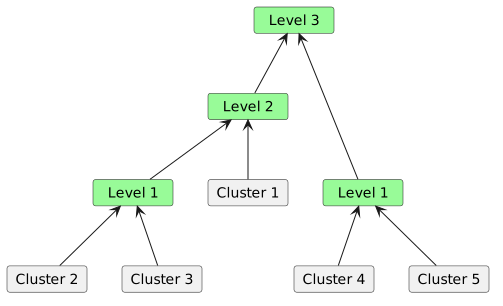
The algorithm works the same in this case, with more distributors present.
On any cluster (leaf
node) in the diagram, one distributor runs for every level
above that cluster in the distribution tree. In the diagram above,
Cluster 2 and Cluster 3 each have 3 distributor instances
running: level 1, level 2 and level 3. Cluster 1 has level 2
and level 3 distributors running, and Cluster 4 and Cluster 5
have levels 1 and 3.
|
Distributing consumer offsets
Consumer offsets are a special case. Kafka stores them in the __consumer_offsets topic. Consider the topic partition below: a consumer has been following the topic, committing message batches, and is now at offset 35. The topic’s retention settings have removed messages 1 through 24 from disk.

Suppose a new cluster comes online. The distributor for the topic replicates messages 25 through 35 to it, and offset distribution then sends offset 35. That offset does not exist on the new cluster, which never saw messages 1 to 24.
The Axual Distributor follows the offset commits instead, and for the latest commit it retrieves the timestamp of the corresponding message. It distributes that timestamp, in this case to the new cluster. Two components do the work. On the originating cluster, the offsetdistributor reads the last committed offset, looks up the corresponding message in the topic partition to get its timestamp, and distributes it as a map keyed on topic/partition/consumer ID with the last committed timestamp as the value. On the receiving cluster, the offsetcommitter reads the timestamp and tells Kafka to set the partition offset to the message carrying it.
| At-least-once delivery has to allow for the time that processing and offset distribution take. The Axual Distributor therefore distributes the timestamp with a configurable margin rather than the exact value (60 seconds by default). After a cluster switch, the consumer group on the new cluster may see some messages the old cluster already processed. |
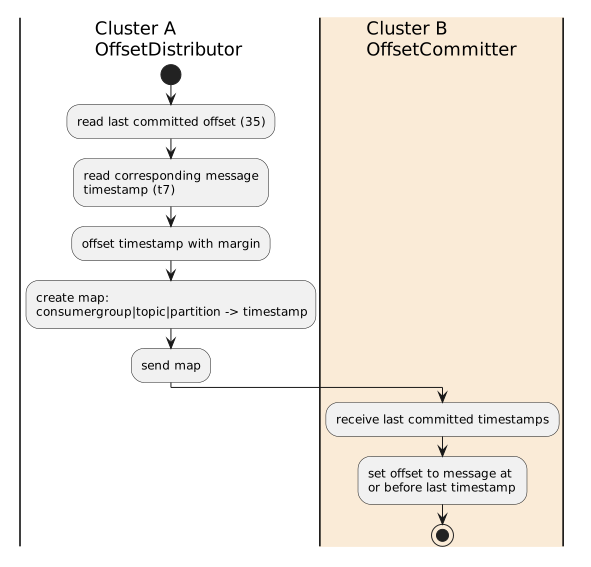
Offset distribution uses the same copy flags, so offsets reach every cluster and no loop forms. The one difference is that the __consumer_offsets topic limits access to the headers, so the copy flags live in the message metadata instead.
How schema distribution differs
Schema distribution has no tree and no copy flags, because it needs neither. Only the instance’s primary cluster accepts schema registrations, and that is the cluster the instance API runs on. There is exactly one source, every other cluster is a read-only follower, and with one source there is no loop to prevent.
For how the Schema Distributor translates subject names between clusters with different naming patterns, and why Apicurio Registry needs none of this, see Schema Distribution.
Setting distribution up
The pages below take the model above and deploy it.
-
How to Deploy the Axual Distributor installs the chart for one cluster and starts the connectors in the order the model requires.
-
How to Load Remote Cluster TLS Material from Kubernetes Secrets keeps remote private keys out of
values.yaml. -
How to Enable JSON Logging in the Axual Distributor makes the Axual Distributor’s log output parseable by a collector.
-
How to Verify Distribution brings distribution up one connector at a time and confirms records arrive exactly once.
-
How to Check Distribution Health reads consumer group lag on a deployment that is already distributing.
-
Offset Distribution and Schema Distribution cover those two connectors in their own right.
Every value these pages set is listed in Distributor Chart Values Reference.