What is "Connect"? What are "Connectors"?
This guide explains the terms Kafka Connect uses on the Axual Platform for clusters, plugins, applications, connectors and tasks, how a Connect Application differs from a regular Kafka application, and the difference between a source and a sink connector.
Type |
Explanation |
Goal |
Understand what each Connect term means, so the right resource is created for the job at hand. |
Audience |
An application owner about to create a Connect Application, and anyone reading the connector catalogue. |
When to use |
Read before creating your first Connect Application, and whenever a Connect term is unclear. |
Glossary of terms
-
Connect Cluster: A cluster of nodes running Kafka Connect. All Connector Tasks run on these machines. On Kafka Connect each tenant has its own Strimzi-managed cluster; on the deprecated Axual Connect one cluster is shared by every tenant on the Instance and is operated by Axual.
-
Connect Plugin: A generic program which can be configured to integrate an external system with Apache Kafka. Kafka Connect delivers it as a per-plugin OCI image or baked into the worker image; the deprecated Axual Connect takes it as a JAR file. Making an OOP analogy, this can be seen as a "class": it has no runtime of its own, but it can create multiple instances of itself when given the required configuration.
-
Connect Application: A term used within the Axual ecosystem to refer to a Self-Service application that manages a group of Connectors of the same Plugin type. This resource helps with facilitating data governance, the Axual way, the same way Axual does with regular Kafka applications.
-
Connector: A configured instance of a Connect Plugin. Continuing the OOP analogy, this can be seen as an "Object": a runtime entity. Multiple Connectors of the same Connect Plugin-type can exist at the same time. Connectors are preconfigured to connect to the kafka cluster, so a developer only needs to supply configuration required to reach the other system.
-
Connector Application: A Connect Application can start one Connector Application (an instance of itself) per environment. This is technically a Connector, deployed onto an Axual-Environment.
-
Connector Task: Connectors are run by using multiple "tasks". This is how Connectors scale: by having multiple parallel (and distributed) processes. All instances have the same configuration.
If Connect is not yet available on your Instance, ask the Axual Platform operators to enable it: Enabling Kafka Connect for the supported runtime, or Installing Axual-Connect for the deprecated one.
Connect Applications
Differences between Connect Applications and regular Kafka applications:
-
For Connect Applications, you need to select a "Plugin type" which corresponds to the system you are integrating with (e.g. JDBC, MQTT, Cassandra, etc.), instead of choosing an "Application type" (e.g. Java, Python, Rest, etc.).
-
Regular Kafka applications require a Certificate PEM file. Connector Applications also require the Private key associated with that certificate. This is because the private key must be available to the running program: since the Custom applications run on the tenant’s infrastructure, the key is with them; Connectors run inside the Connect Cluster, so the key must be made available within it.
-
You can see the status of every Connector Application in the Self-Service portal. You can also start and stop them from the same place. Custom application lifecycles are handled by the developers and no information about their runtime is displayed in the portal.
Source and sink connectors
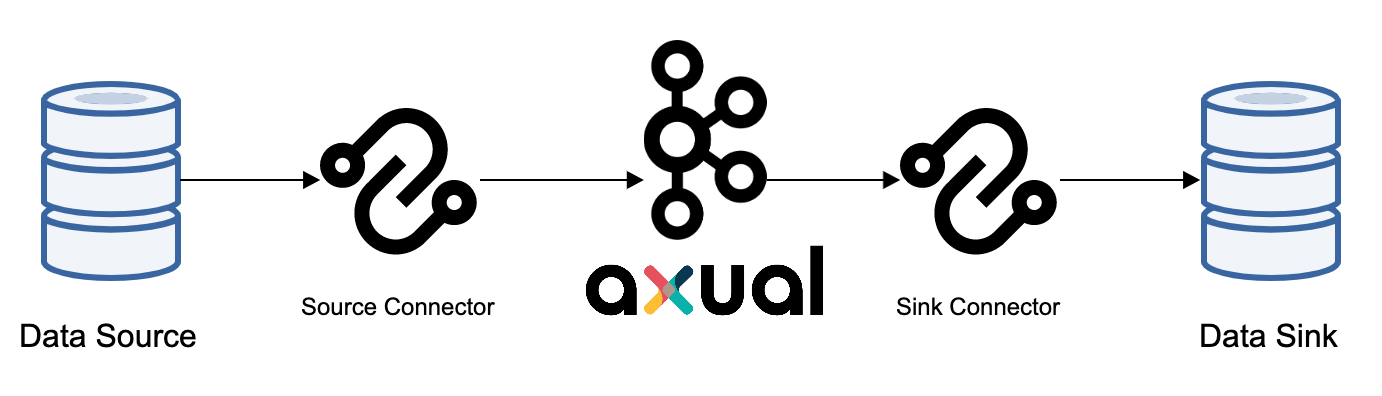
To copy data between Kafka and another system, you use a Connector built for that system. Connectors come in two flavours:
-
Source connectors import data from another system into Kafka. For example, a
JDBCSourceConnectorimports a relational database into Kafka. -
Sink connectors export data from Kafka into another system. For example, a
JDBCSinkConnectorexports the contents of a Kafka topic into a relational database.
| "Source" and "sink" describe the integrated system, not Kafka. A source connector’s source is the external system, not the Kafka topic. |
So to sync all data from Kafka into an SQL database you configure a JDBC sink connector in Axual Self-Service, rather than writing an application of your own.
|
Automatic registration of Avro schemas and Kafka topics is disabled on the Axual Platform. You have to deploy the topics before the connectors can use them. |
Before a sink connector can be tested, its source topic needs records on it. See How to Produce Sample Data for a Sink Connector.