Apicurio Registry
This reference is the entry point for Apicurio Registry in the Axual Platform: the schema formats it stores, how the Auth Proxy serves OAuth and Basic Auth clients from one deployment, and the pages that cover the registry for developers, Instance Admins and operators.
Type |
Reference |
Goal |
Find the Apicurio Registry page the task at hand needs. |
Audience |
Developers writing SerDes clients, Instance Admins configuring an Instance, and Platform Operators deploying the registry. |
When to use |
Start here when working with schemas in the Axual Platform, then follow the link that matches your role. |
Apicurio Registry provides schema storage and validation for Kafka client applications. Axual Platform uses it for schema storage, supporting Avro, Protobuf, and JSON Schema formats, as well as both BasicAuth and OAuth authentication for SerDes clients.
|
Apicurio Registry v3 is the current, recommended version in the Platform. |
|
In Axual’s build of Apicurio Registry v3, clients without write access can still call the Confluent-compatible register endpoint for a schema that is already registered. Upstream Apicurio Registry requires write access for this call, and Axual will align with it in a future release. |
Schema Types
Apicurio supports the following schema formats:
-
Avro: recommended, with a native Kafka fit and flexible schema evolution
-
Protobuf: suited to RPC and microservice integrations
-
JSON Schema: suited to API validation use cases
For a detailed comparison of schema formats and serialization guidance, see Selecting Data Formats.
Authentication and the Auth Proxy
Apicurio Registry authenticates with one method at a time: a deployment configures it for either OAuth or Basic Auth, and it cannot serve both. The Auth Proxy removes that limit. It is a sidecar container that sits in front of the registry in the same pod and does the authentication itself, validating a JSON Web Token (JWT) for an OAuth client and a username and password for a Basic Auth client, then forwarding the request to the registry on localhost. Once it is enabled, every call reaches the registry through it, including SerDes client connections and Platform Manager calls.
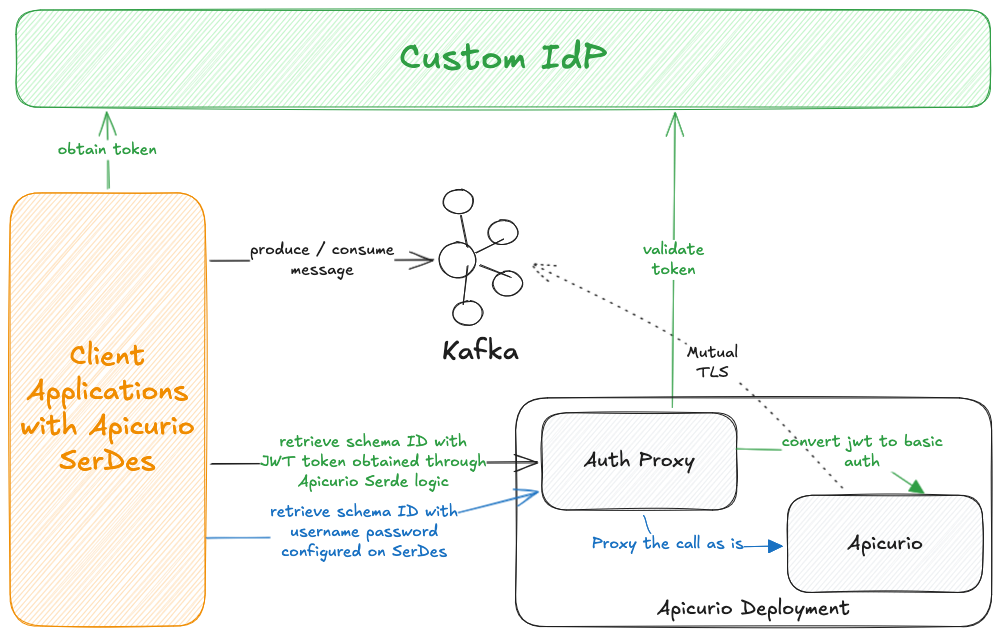
Green arrows in the diagram trace the OAuth (JWT) flow and blue arrows trace the BasicAuth flow.
For a Basic Auth client, the proxy derives the secret it presents to the registry from the client’s username, a configured salt and a hash algorithm. The salt gives that derivation two properties. The same username always produces the same secret, so the registry authenticates the client consistently. A caller who does not know the salt cannot reproduce the secret for a username it already knows. Two environments sharing a salt therefore share every derived credential, so each environment sets its own.
The procedure and the values are in How to Enable the Apicurio Auth Proxy.
For Developers
These pages cover writing and configuring a client that reads or writes schemas:
-
Selecting Data Formats compares the schema formats and covers SerDes configuration and encoding strategies.
-
Apicurio Registry Authentication for SerDes covers configuring BasicAuth and OAuth on Apicurio SerDes clients.
-
Schema Management covers uploading and managing schemas in Self-Service.
| Java examples demonstrating serializer and deserializer usage are available in the public client-java-examples repository. |
For Instance Admins
These pages cover the Instance settings that point the platform at a registry:
-
Instance Schema Registry Configuration covers configuring Apicurio Registry for an Instance.
-
Client Authentication support for an Instance covers enabling BasicAuth for SerDes clients.
For Operators
These pages cover deploying the registry and the identity provider it authenticates against:
-
Streaming Installation places the registry in the wider streaming installation.
-
How to Enable Apicurio Registry covers deployment, Kafka integration, TLS, and OAuth Auth Proxy setup.
-
Apicurio Keycloak Realm covers configuring Keycloak for Apicurio authentication.
-
Migrating from Legacy Schema Registry to Apicurio Registry covers moving existing schemas onto Apicurio.
Helm Chart Reference
Two pages describe the chart, one written and one generated from the chart itself:
-
Apicurio Chart Values Reference explains the values that need explaining, grouped by the job each one does.
-
Apicurio Helm Readme lists every key the chart accepts, with its default.