Connector Application States
This reference describes the actions available on a connector application and its tasks, the states a connector application can hold, the mapping between the connector status and the status shown on the Application card, and the flavours of deployment configuration keys.
Type |
Reference |
Goal |
Look up the actions, states, and configuration-key flavours of a connector application. |
Audience |
An Application owner who can start, stop, and configure a connector application in Self-Service. |
When to use |
When you need to interpret the state shown on a connector Application card or classify a deployment configuration key. |
Available connector application actions
The following actions are available on a connector application. The Platform Manager polls the connector status and displays the current state on the Application card.
| Connector action | Effect |
|---|---|
|
Creates the connector on Kafka Connect, or resumes it when it’s paused, stopped, or unassigned. Available in the |
|
Pauses the connector, or deletes it from Kafka Connect when it has no tasks. Available in the |
|
Restarts the connector instance. Its tasks aren’t restarted. Available in the |
|
Deletes the connector from Kafka Connect. The connector configuration in Self-Service is kept. Available in the |
Available connector task actions
The following actions are available on the tasks of a connector application.
| Task action | Effect |
|---|---|
|
Opens the task list with the status, worker, and trace of each task. Available once the connector has started. A red alert icon marks the button when a task has status |
|
Restarts one task. Available on every task in the |
State lifecycle
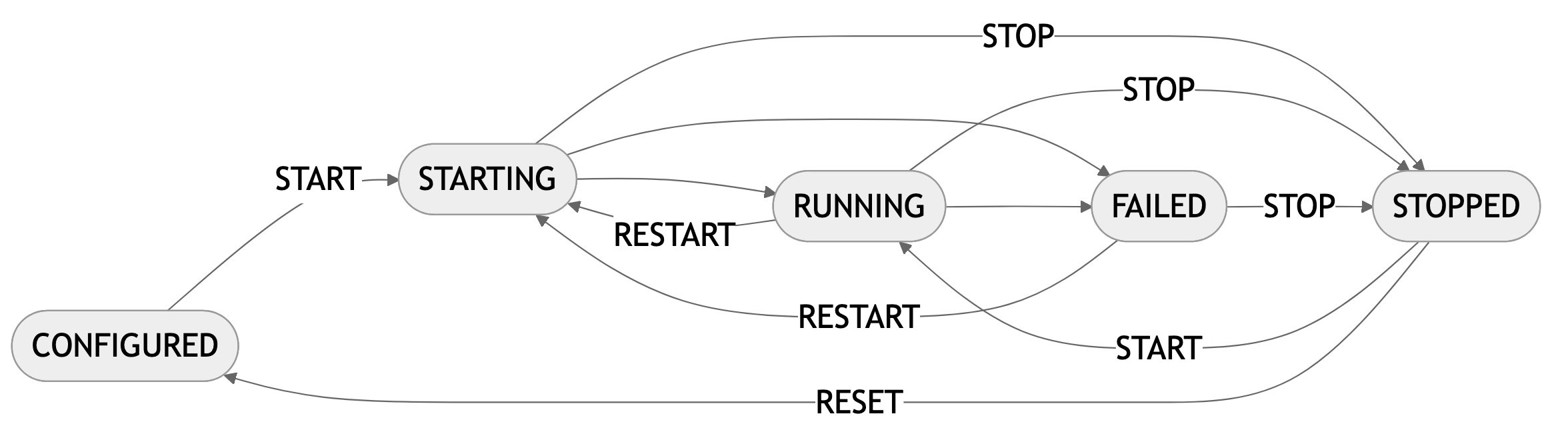
A connector application transitions through states based on the connector status and user actions. The Platform Manager polls the status and displays the current state on the Application card. The following table lists the transitions between states.
| From state | Trigger | To state |
|---|---|---|
|
|
|
|
The connector reports status |
|
|
The connector reports status |
|
|
|
|
|
|
|
|
|
|
|
|
|
|
|
|
The following diagram shows the same lifecycle.
Status mapping
Self-Service polls the Platform Manager for the connector status while the Application Overview page is open. The status shown on the Application card is one of the following. Each task status uses the same mapping.
| Status | Connector status | Condition |
|---|---|---|
|
(no connector) |
No connector exists on Kafka Connect. This is the initial state before the first |
|
|
The connector has been submitted or is restarting; it hasn’t yet reported |
|
|
The connector is processing data. A failed task shows with status |
|
|
The connector is paused, stopped, or not assigned to a worker. |
|
|
The connector raised an exception. Use |
|
(status request fails) |
The Platform Manager can’t read the connector status. The Application card shows the error as a tooltip. |
| The Application card shows no status until a deployment target, the cluster and plugin version, is selected. |
Configuration key flavours
The application deployment configuration keys come in four flavours. Each flavour is identified in the Self-Service form by a distinct marker.
| Flavour | Description |
|---|---|
Mandatory |
Identified by an asterisk on the left side. The configuration cannot be saved without a value for these keys. |
Optional |
May carry a default value provided by the plugin. A cross (X) icon next to the value removes the provided default. |
Custom |
Created by you while defining the application deployment configuration. A bin icon on the right side of the value deletes the key. |
Unsupported |
Obsolete keys used by previous versions of the connector plugin and no longer used by the current version. These keys should be deleted. |