Flink Application States
This reference lists the actions available on a Flink application, the states a Flink application can hold, and the mapping between the Flink job status and the status shown on the Application card.
Type |
Reference |
Goal |
Look up the actions, states, and status conditions of a Flink application. |
Audience |
An Application owner who can start and stop a Flink application in Self-Service. |
When to use |
When you need to interpret the state shown on a Flink Application card or check which action a state allows. |
Available application actions
The following actions are available to the Application owner. The Platform Manager polls the Flink job status and displays the current state on the Application card.
| Application action | Effect |
|---|---|
|
Starts the Flink job with no state restored from a previous run. Available in the |
|
Cancels the Flink job. Available in the |
|
Starts the Flink job from its latest state. Available in the |
|
Returns the application to |
No action is available in the Stopping state.
State lifecycle
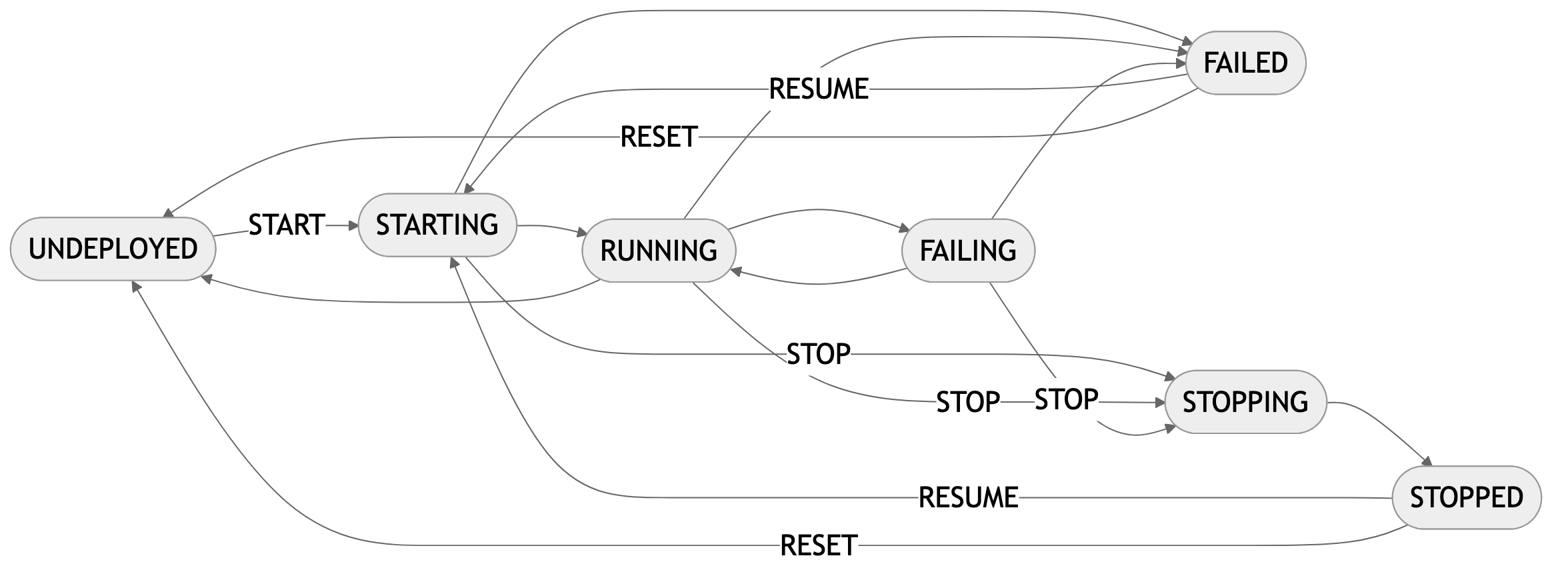
A Flink application transitions through states based on the Flink job status and user actions. The Platform Manager polls the status and displays the current state on the Application card. The following table lists the transitions between states.
| From state | Trigger | To state |
|---|---|---|
|
|
|
|
The Flink job reports status |
|
|
The Flink job reports status |
|
|
The Flink job reports status |
|
|
|
|
|
The Flink job reports status |
|
|
The Flink job reports status |
|
|
|
|
|
|
|
The following diagram shows the same lifecycle.
Status mapping
Self-Service polls the Platform Manager for the Flink job status while the Application Overview page is open. The status shown on the Application card is one of the following.
| Status | Flink status | Condition |
|---|---|---|
|
(no job), |
No Flink job is running and the application wasn’t stopped with |
|
|
The Flink job is being provisioned; it hasn’t yet reported |
|
|
The Flink job is active and processing data. |
|
|
The Flink job is restarting after a failure. Use Viewing Application Logs to investigate. |
|
|
The Flink job has failed. Use Viewing Application Logs to investigate, then |
|
|
The Flink job is being cancelled. |
|
|
The application was stopped with |
|
Any other status |
The Platform Manager doesn’t recognise the Flink job status. No action is available. |