Self Service
Introduction
When you are building your streaming use case, there are typically a lot of steps to take before your application is happily consuming/producing in production. Whether you are consuming from an existing topic, or planning to produce to a new one, Self Service guides you through the process of setting up your application and topic. Moreover, it allows you to have fine-grained access control on your topics.
Features
Topic and application metadata
The Self Service displays valuable metadata about topics and the applications interacting with them, such as:
-
The format of the data that’s present on the topic
-
How long until the data is removed from the topic
-
Which applications are the producers and the consumers of this data
The Topic Graph provides you with a good overview of the entire topic and application landscape in a certain environment.
Application lifecycle support
As you are promoting your application from development to production, you want to do the same with the topics as well. The Self Service supports both the application and topic lifecycle by allowing you to define environments. If you want to test your app or topic in isolation, you can even define private environments.
Security
Unauthenticated access to the Axual Platform is impossible. Applications which were authorized with access to topics must present the registered application certificate or a valid username/password combination.
Topic authorization
The data owner must approve user’s topic authorization requests in order for them to have access to the data. This allows for fine-grained topic access control in any environment.
Glossary
Before you start using Self Service to manage your applications and topics, it is crucial to understand its basic concepts. The following glossary helps with that.
- Topic
-
A topic represents a flow of information (messages), which is continuously updated.
- Application
-
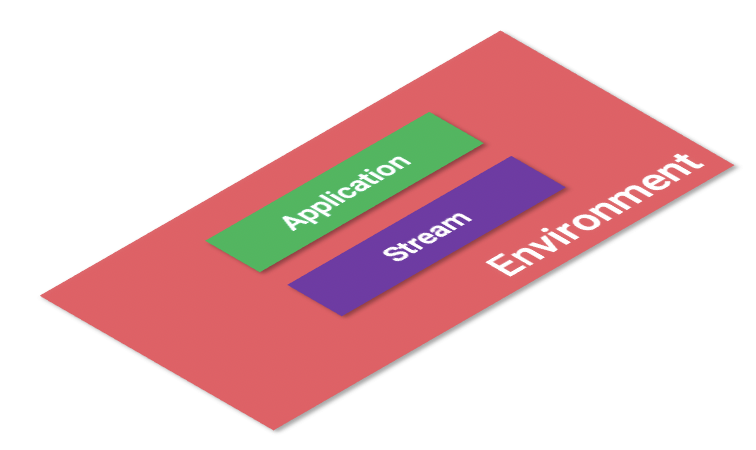
An application represents anything that is responsible for producing and/or consuming data on a topic, whether it is a Java or .NET app or a connector.
- Cluster
-
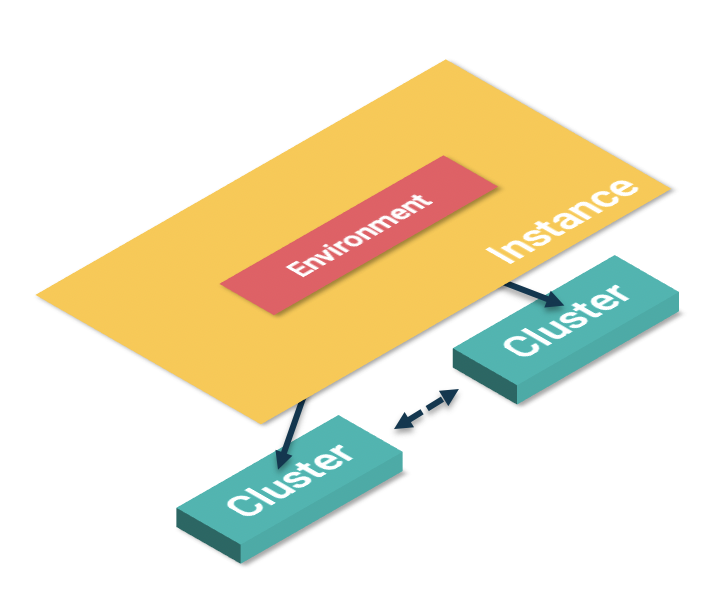
A cluster represents a physical messaging unit consisting of Kafka and a Schema Registry.
- Environment
-
An environment is used to logically and/or physically separate resources on a Kafka cluster. Environments are mapped to a physical Kafka cluster through the instance (see below). Whereas public environments typically map to the application lifecycle, private environments isolate a team’s apps and topics.
- Instance
-
An instance provides an abstraction layer over 1..n clusters, ensuring that all data within an instance is synchronized. All topics in different environments mapped to this instance can exist on the same underlying Kafka cluster.
- Tenant
-
A tenant in Self Service is no other than a reference to your company and its the context in which topics, applications, environments, instances, users, and groups exist.
- Topic Team
-
The Topic Team typically supports the platform and its components; they may also double as an infrastructure team.
|
|
Getting started with Self Service
To access the Self Service Portal, use the URL provided to you by Axual or your local topic team.
|
Latest versions of Chrome and Firefox and Edge (Chromium based) are supported browsers. Currently, Microsoft Internet Explorer and older versions of Microsoft Edge are unsupported. |
Logging In
To access the login screen, you will need to visit a pre-configured URL, which will follow the same format as follows, where tenantName is the name of your company or team:
Following this, depending on your organization’s security mechanisms, you are presented with an OAuth provider (Azure, LDAP, Google, etc.) or a basic authentication screen if your company doesn’t support an OAUTH structure.