Schema Registry Authentication for SerDes
Overview
Serializers and Deserializers (SerDes) in Kafka clients communicate with the Schema Registry to resolve and register schemas. When Apicurio Schema Registry has anonymous read disabled, your application must supply credentials as part of its SerDes configuration.
Two authentication methods are supported for Apicurio:
Both methods are configured directly on the SerDes, independently of the broker authentication your application uses.
For background on Schema Registries and SerDes, see Selecting Data Formats.
Prerequisites
Before your application can use SerDes authentication, the following must be in place:
-
BasicAuth: The Instance must have Client Authentication enabled by the Instance Admin. See Client Authentication support for an Instance.
-
BasicAuth and OAuth: The Auth Proxy must be deployed for the Instance by the Operator. Apicurio does not support multiple authentication methods simultaneously, so the Auth Proxy acts as a sidecar that handles both OAuth and BasicAuth in front of Apicurio. See Enabling OAuth for Apicurio client connections.
Generating Schema Registry Credentials
When configuring your Application, generate Schema Registry credentials in the Self-Service portal:
-
Navigate to the detail page of your Application
-
Select the environment for which you want credentials
The Environment must belong to an Instance with Apicurio and the settings mentioned earlier present -
Click the lock icon (Authentication) on the Application card
-
In the Authentication modal, locate the Schema Registry section and select the type of Authentication you want
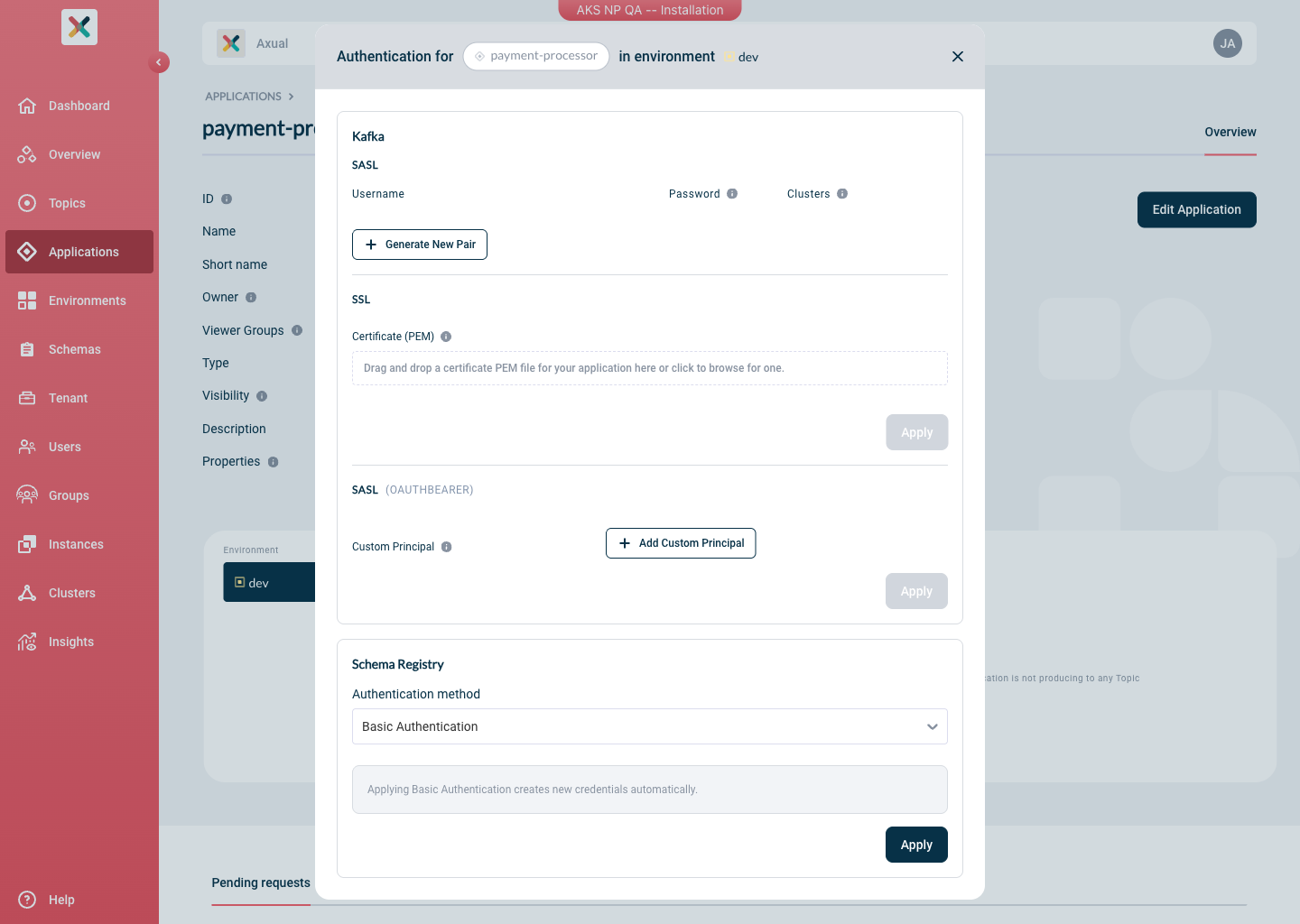
Limitation: Each application can use only one authentication method (BasicAuth or OAuth) per environment when connecting to Apicurio.
| In case of Basic Authentication the password is only shown once at generation time. Store it securely before closing the modal. . Copy the generated username and password or provide the Principal in case of OAuth |
+ TIP: What principal should you provide? See Principal/Claim relationship below.
Client Code Setup
Add the Apicurio SerDes dependency:
<dependency>
    <groupId>io.apicurio</groupId>
    <artifactId>apicurio-registry-serdes-avro-serde</artifactId>
    <version>${apicurio.version}</version>
</dependency>
BasicAuth
BasicAuth uses the username and password pair generated in Self-Service to authenticate the SerDes client against Apicurio.
Configure the serializer/deserializer:
import io.apicurio.registry.serde.SerdeConfig;
import io.apicurio.registry.serde.avro.AvroSerde;

// Schema Registry connection
props.put(SerdeConfig.REGISTRY_URL, "https://platform.<domain>:24000/apis/ccompat/v7");
props.put(SerdeConfig.AUTO_REGISTER_ARTIFACT, false);

// BasicAuth credentials (generated in Self-Service)
props.put(SerdeConfig.AUTH_USERNAME, "<sr-username>");
props.put(SerdeConfig.AUTH_PASSWORD, "<sr-password>");

// SerDes class
props.put(StreamsConfig.DEFAULT_KEY_SERDE_CLASS_CONFIG, AvroSerde.class.getName());
props.put(StreamsConfig.DEFAULT_VALUE_SERDE_CLASS_CONFIG, AvroSerde.class.getName());|
For a producer or consumer application (not Kafka Streams), replace |
OAuth
OAuth uses the OIDC client credentials flow. The SerDes library obtains a bearer token from your Identity Provider and presents it to Apicurio on each request. Any OIDC-compatible provider is supported, including Keycloak and Azure Entra ID.
Contact your Tenant Admin to obtain the OAuth client credentials (client-id and client-secret) and the token endpoint details for the relevant instance.
|
import io.apicurio.registry.serde.SerdeConfig;
import io.apicurio.registry.serde.avro.AvroSerde;

// Schema Registry connection
props.put(SerdeConfig.REGISTRY_URL, "https://platform.<domain>:24000/apis/ccompat/v7");
props.put(SerdeConfig.AUTO_REGISTER_ARTIFACT, false);

// OAuth client credentials
props.put(SerdeConfig.AUTH_SERVICE_URL, "https://<keycloak-host>/auth");
props.put(SerdeConfig.AUTH_REALM, "<realm>");
props.put(SerdeConfig.AUTH_CLIENT_ID, "<client-id>");
props.put(SerdeConfig.AUTH_CLIENT_SECRET, "<client-secret>");

// SerDes class
props.put(StreamsConfig.DEFAULT_KEY_SERDE_CLASS_CONFIG, AvroSerde.class.getName());
props.put(StreamsConfig.DEFAULT_VALUE_SERDE_CLASS_CONFIG, AvroSerde.class.getName());
Principal/Claim relationship
The principal is the value of the claim configured on the Auth-Proxy on startup time as specified in the operator documentation.
As an example, if the token that the Identity Provider returns looks like this:
{
 "sub": "1234567890",
 "name": "John Doe",
 "admin": true,
 "iat": 1516239022
}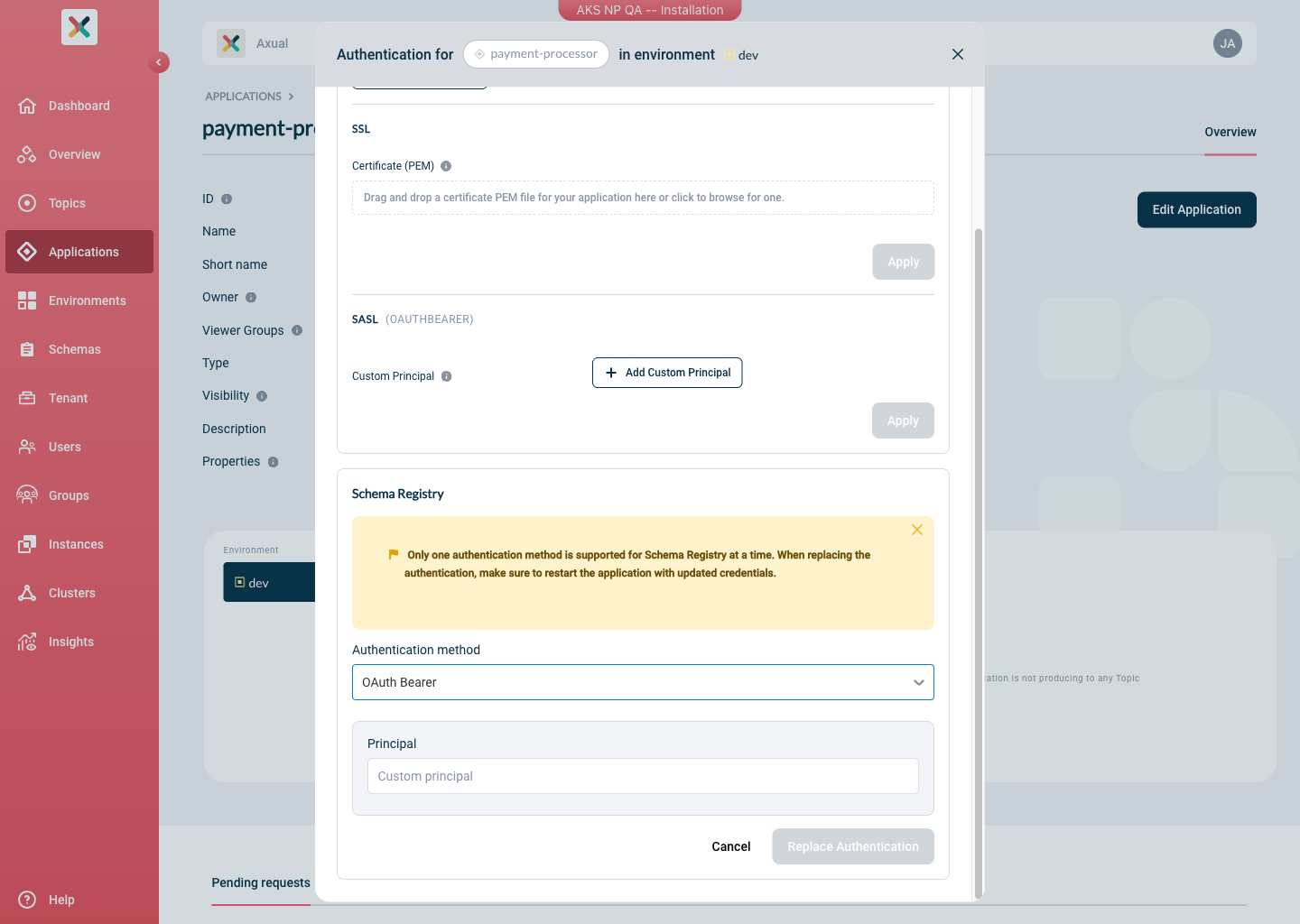
and the user-name-claim set on Apicurio AuthProxy is sub, the Principal that you will need to provide to the Self Service Authentication modal would be: 1234567890.
Choosing Between BasicAuth and OAuth
| BasicAuth | OAuth | |
|---|---|---|
Credentials managed in |
Self-Service (generated per application/environment) |
Self-Service & Identity Provider (managed by external party) |
Rotation |
Delete old pair and generate a new one in Self-Service |
Rotate the client secret in the Identity Provider |