Axual MCP Server - User Guide
Welcome to the Axual MCP Server user guide! This guide will help you get started with using the Model Context Protocol (MCP) server to interact with your Axual platform through conversational AI interfaces like Claude.
Introduction
The Axual MCP Server provides an AI-powered interface to interact with your Axual Kafka platform. Instead of manually navigating the Axual UI or writing API scripts, you can simply describe what you want to accomplish in natural language, and the AI assistant will use the MCP server to execute the necessary operations.
What is MCP?
Model Context Protocol (MCP) is an open protocol that enables AI assistants like Claude to securely connect to external tools and data sources. The Axual MCP Server implements this protocol, allowing Claude to:
-
Create and manage Kafka topics (schema not supported yet)
-
Search and discover existing Kafka topics
-
Deploy streaming applications
-
Produce and browse messages
-
Request access permissions
-
Query environment information
The Axual MCP server supports OAuth 2.1 as per the latest MCP specification, enabling users to authenticate via their existing identity providers in the same way as authenticating to Self Service.
Getting Started
Preparations
| Read this first before you give MCP server a spin. |
If you are about to try MCP server in an existing live environment, please take the following precautions.
-
Create a private environment for MCP testing purposes. An additional benefit of this is that you can enable "auto approval" for topic access requests.
-
Use a dedicated user for MCP testing purposes.
-
Create a separate group for this user, not owning any existing resources.
-
Do not use the TENANT_ADMIN role for the user.
Get the MCP Server URL
The MCP server URL should be communicated to you. It will be connected to your tenant in Self-Service.
Connecting to the Server
You can use any AI client application that supports MCP. We will use Claude Code as an example here.
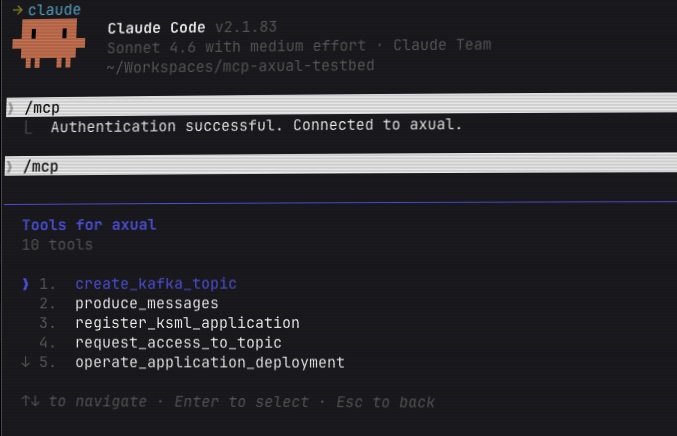
To use the Axual MCP Server with Claude Code, you need to add the server using the Claude Code CLI command.
| Claude Code is required because the Axual MCP Server uses HTTP transport for remote MCP servers, which is not supported by Claude Desktop free version. |
Run this command in your terminal:
claude mcp add --transport http axual [your-mcp-server-url]This will automatically configure the Axual MCP server for you. Note that the MCP server will be available only in the folder where you run this command.
Your First Interaction
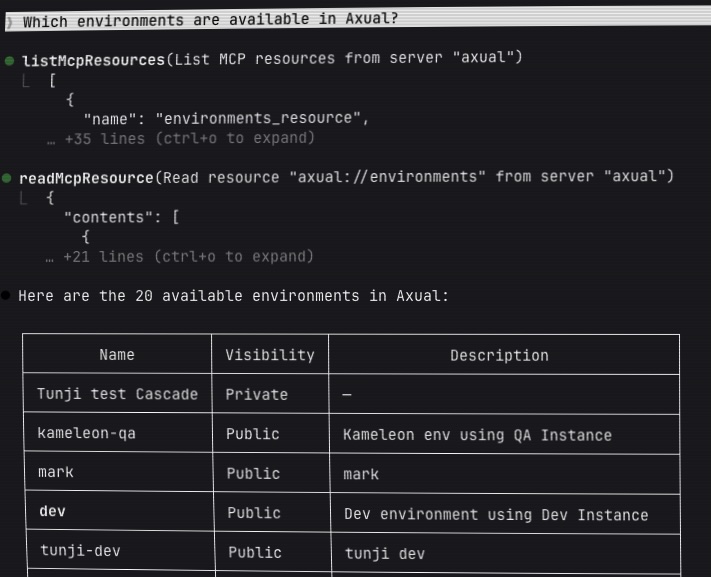
Once connected, try asking Claude:
"What environments are available in Axual?"
Claude will automatically use the MCP server to fetch the list of environments and display them to you. This simple interaction demonstrates how natural language queries are translated into actions on your Axual platform.
Quick Start Examples
Searching for Existing Topics
Before creating new topics, you may want to check what already exists:
Example 1: Find your topics
"Show me all Kafka topics owned by my team"
Example 2: Search by name
"Find all topics with 'customer' in the name"
Example 3: Search by group
"What topics are owned by the DataEngineering team?"
The MCP server will search through all streams and return matching results with details like owner, description, retention policy, and creation date.
Checking Topic Deployments
Understanding where topics are deployed is crucial for operational visibility:
Example 1: View all deployments in an environment
"Show me all topic deployments in the production environment"
Example 2: Check where a topic is deployed
"Where is the 'customer-events' topic deployed?"
Example 3: Check a specific deployment
"Is the 'orders' topic deployed in the staging environment?"
The MCP server will show you deployment details including partition counts, retention settings, and deployment metadata.
Creating Your First Kafka Topic
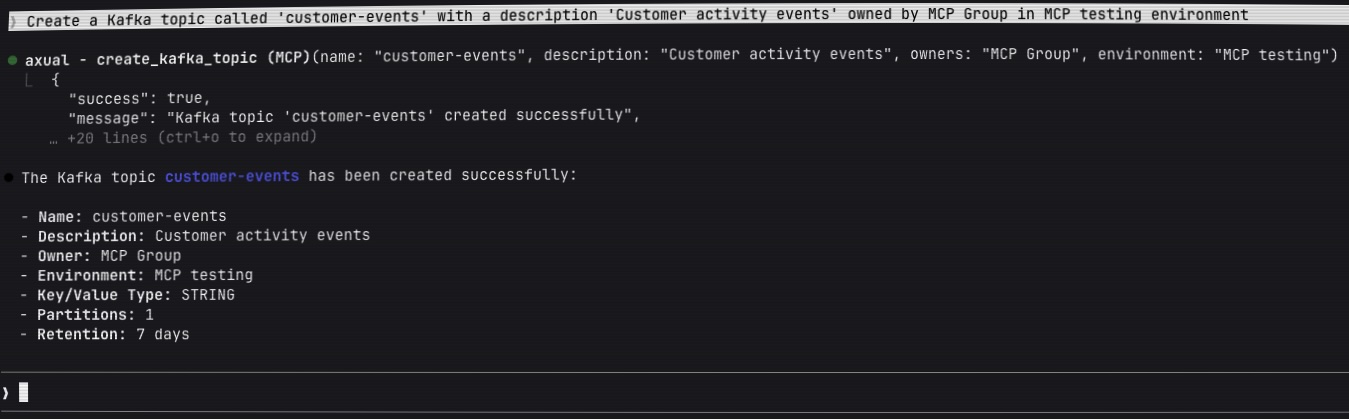
The most common task is creating a new Kafka topic. Here’s how simple it is:
Example 1: Basic topic creation
"Create a Kafka topic called 'customer-events' with a description 'Customer activity events'"
The MCP server will:
-
Create a stream template with your specified name
-
Ask you for the environment or choose an existing environment based on the conversation
-
Ask you for the group that should own the topic or choose an existing group based on the conversation
-
Return the topic details including its unique ID
Example 2: Topic with custom configuration
"Create a topic called 'sensor-data' with 3 partitions, 14 days retention, and compact retention policy"
Example 3: Topic with specific environment
"Create a topic called 'orders' in the production environment with the DataEngineering team as owners"
Producing Messages to a Topic
Once you have a topic, you can produce test messages to it:
Example 1: Simple message generation
"Produce 10 test messages to the 'customer-events' topic with sample customer data"
Example 2: Custom message structure
"Produce messages to 'sensor-data' topic with the following structure: sensor_id as key and JSON values containing temperature, humidity, and timestamp fields. Generate 20 messages every 2 seconds."
The MCP server uses KSML (Kafka Streams Markup Language) to generate and produce messages with realistic test data.
Available Tools
The Axual MCP Server provides eight powerful tools that enable complete Kafka topic lifecycle management:
create_kafka_topic
Creates a new Kafka topic by creating a stream template and deploying it to an environment.
Parameters:
-
name(required): Topic name (3-180 characters; letters, numbers,.,_,-) -
description(optional): Human-readable description of the topic -
key_type(optional): Key serialization type (default:"STRING")-
Supported values:
STRING,LONG,INTEGER,DOUBLE,BINARY
-
-
value_type(optional): Value serialization type (default:"STRING")-
Supported values:
STRING,LONG,INTEGER,DOUBLE,BINARY,JSON
-
-
retention_policy(optional): Data retention behavior-
"delete": For typical event streams (time-based retention) -
"compact": For table-like semantics (keeps latest value per key)
-
-
retention_time_days(optional): How long to keep messages (default: 7 days) -
partition_count(optional): Number of partitions (default: 1) -
environment(optional): Environment name or ID to deploy to -
owners(optional): Owner group name or ID
Example Usage:
Create a topic named 'user-activity' with JSON values,
3 partitions, compact retention, owned by the Analytics team
What it does:
-
Validates the topic name and parameters
-
Resolves the owner group (prompts if needed)
-
Creates a stream template in Axual
-
Resolves the target environment (prompts if needed)
-
Deploys the stream configuration to the environment
-
Returns the created topic details with UIDs
search_kafka_topics
Search for Kafka topics (streams) using various filter criteria to discover existing topics.
Parameters:
-
my_streams(optional): Filter to show only streams owned by you or your groups (boolean)-
Set to
trueto see only your streams -
Set to
falseto see all streams -
Omit to not apply this filter
-
-
stream_id(optional): Filter by stream UID - the unique identifier of a specific stream -
name(optional): Filter by stream name - searches for streams whose name contains the provided text (partial match) -
description(optional): Filter by stream description - searches for streams whose description contains the provided text -
group_name(optional): Filter by owning group name - find all streams owned by a specific team or organization -
tag(optional): Filter by tag - searches for streams tagged with the specified tag
Example Usage:
Show me all topics owned by my team
Find all topics with 'payment' in the name
What topics are owned by the FinanceTeam?
What it does:
-
Queries the Axual API with the specified filter criteria
-
Returns matching streams with complete details:
-
Stream UID and name
-
Description and owner information
-
Key and value types
-
Retention policy
-
Creation and modification timestamps
-
-
Provides pagination information for large result sets
-
All parameters are optional and can be combined for precise searches
Use cases:
-
Discovering existing topics before creating new ones
-
Finding topics owned by specific teams
-
Locating topics by naming patterns
-
Auditing topic ownership and configuration
search_kafka_topic_deployments
Search for Kafka topic deployments (stream configurations) to understand where topics are deployed and their environment-specific configurations.
Parameters:
-
stream_id(optional): Stream UID (unique identifier) of the Kafka topic template-
Find all environments where this specific topic is deployed
-
At least one of
stream_idorenvironment_idmust be provided
-
-
environment_id(optional): Environment UID (unique identifier) to filter deployments-
When provided with
stream_id: Returns the deployment of that specific topic in this environment -
When provided alone: Returns all topic deployments in this environment
-
At least one of
stream_idorenvironment_idmust be provided
-
Example Usage:
Show me all topic deployments in the production environment
Where is the 'customer-events' topic deployed?
Check if topic stream-123 is deployed in environment env-456
What it does:
-
Supports three search modes:
-
By environment only: Get all topics deployed in a specific environment
-
By topic only: Get all environments where a specific topic is deployed
-
By both: Check if a specific topic is deployed in a specific environment
-
-
Returns deployment details including:
-
Deployment UID (stream configuration UID)
-
Topic name and ID
-
Environment name and ID
-
Partition count
-
Retention time and policy
-
Creation and modification metadata
-
-
Provides comprehensive deployment information for operational visibility
Use cases:
-
Checking where a topic is deployed across environments
-
Discovering all topics deployed in a specific environment
-
Verifying deployment configurations (partitions, retention)
-
Auditing topic deployments for compliance
-
Planning topic migrations or updates
produce_messages
Produces messages to an existing Kafka topic using KSML-based data generation.
Parameters:
-
ksml_definition(required): YAML definition for message generation (see KSML Data Generator resource) -
stream_config_id(optional): Direct stream configuration UID -
stream_name(optional): Stream name to lookup -
stream_id(optional): Stream template ID -
environment_name(optional): Environment name -
environment_id(optional): Environment UID -
group_name(optional): User group for access permissions
Example Usage:
Produce 50 messages to 'customer-events' topic every 1 second with:
- Key: customer ID (customer_001 to customer_010 rotating)
- Value: JSON with fields: event_type, timestamp, amount, status
What it does:
-
Resolves the stream configuration from provided identifiers
-
Creates a temporary KSML application with data generator
-
Sets up necessary access grants (producer permissions)
-
Deploys and starts the application
-
Messages are produced according to the KSML definition
-
Returns application deployment details and credentials
Use the axual://ksml_data_generator resource for KSML definition examples and syntax.
|
register_ksml_application
Registers a new KSML streaming application, deploys it to an environment, and generates authentication credentials.
Parameters:
-
name(required): Application name (3-100 characters) -
application_id(optional): Custom application ID (generated from name if omitted) -
application_short_name(optional): Short name (3-25 characters, generated if omitted) -
visibility(optional):"Public"or"Private"(default:"Public") -
owner_group(optional): Owner group name or ID -
description(optional): Application description -
environment(optional): Environment name or ID for deployment -
ksml_definition(optional): KSML application definition (YAML)
Example Usage:
Register a KSML application called 'Real-time Analytics'
that filters customer events and writes to an aggregated topic
What it does:
-
Generates application ID and short name if not provided
-
Resolves owner group (prompts if needed)
-
Creates the application in Axual
-
Resolves environment (prompts if needed)
-
Deploys application with KSML definition
-
Generates SASL/SCRAM credentials for authentication
-
Returns application details, deployment UID, and credentials
Use the axual://ksml_definition resource for comprehensive KSML application examples.
|
request_access_to_topic
Requests producer or consumer access for an application to a specific topic in an environment.
Parameters:
-
application_uid(required): Application unique identifier -
topic_uid(required): Topic/stream unique identifier -
environment(optional): Environment name or UID (prompts if not provided) -
access_type(required): Type of access to request-
"CONSUMER"or"CONSUME": Read access to the topic -
"PRODUCER"or"PRODUCE": Write access to the topic
-
Example Usage:
Grant consumer access to application abc123
for topic xyz789 in the production environment
What it does:
-
Validates application and topic UIDs
-
Resolves environment (prompts if needed)
-
Normalizes access type (supports multiple formats)
-
Creates an application grant request in Axual
-
Returns the grant UID and approval status
| The grant may require approval depending on your Axual governance policies. |
operate_application_deployment
Operates an existing application deployment with lifecycle actions.
Parameters:
-
deployment_uid(required): Application deployment unique identifier -
action(required): Action to perform-
"START": Start the application -
"STOP": Stop the application -
"RESET": Reset the application state (consumer offsets) -
"DELETE": Delete the application deployment
-
Example Usage:
Stop the application deployment def456
Reset and restart the deployment for my analytics application
What it does:
-
Validates the deployment UID
-
Validates the action type
-
Executes the requested lifecycle operation
-
Returns the operation result and new deployment state
DELETE and RESET actions are destructive and cannot be undone.
|
browse_kafka_messages
Browse and search messages in a Kafka topic within a time range.
Parameters:
-
stream_config_uid(required): Stream configuration unique identifier -
from_timestamp(optional): Start time in Unix epoch milliseconds (default: 1 hour ago) -
to_timestamp(optional): End time in Unix epoch milliseconds (default: now) -
keyword(optional): Keyword to filter messages
Example Usage:
Show messages from stream config abc123 from the last 30 minutes
Browse messages in 'customer-events' containing the word 'error'
Display messages from yesterday between 2 PM and 4 PM
What it does:
-
Resolves the stream configuration and environment
-
Determines the Kafka cluster endpoint
-
Queries messages within the specified time range
-
Applies keyword filtering if provided
-
Returns message details including keys, values, timestamps, and offsets
| Message browsing may have limits depending on cluster configuration and data volume. |
Available Resources
Resources provide read-only access to documentation and reference data. Claude can automatically fetch these when needed.
axual://environments
Description: Lists all available Axual environments with key information.
Returns: JSON array of environments with details:
-
UID
-
Name
-
Short name
-
Visibility (Public/Private)
-
Instance details
-
Owners
Example Query:
What environments are available?
Show me all public environments
axual://ksml_data_generator
Description: Comprehensive documentation and examples for KSML data generator syntax.
Contains:
-
YAML structure for data generation
-
Python code examples for key/value generation
-
Configuration options (interval, count, topic mapping)
-
Complete working examples for different data types
When to use: Reference this when you need to produce test messages to a topic.
Example Query:
Show me how to write a KSML data generator for producing sensor data
axual://ksml_definition
Description: Complete guide for writing KSML streaming application definitions.
Contains:
-
KSML application structure and syntax
-
Stream processing patterns (filter, map, aggregate)
-
Multiple source/sink configurations
-
State store usage
-
Error handling patterns
-
Real-world examples
When to use: Reference this when creating streaming applications that process data.
Example Query:
Help me write a KSML application that filters events and aggregates by customer ID
Common Workflows
Workflow 1: Create Topic and Produce Test Data
-
Create the topic:
Create a topic called 'orders' with JSON values,
3 partitions, and owned by the Commerce team
-
Produce test messages:
Produce 100 test messages to 'orders' with:
- Key: order ID (order_001 to order_020 rotating)
- Value: JSON with order_date, customer_id, amount, status
Produce one message every second
-
Verify the messages:
Show me the latest 10 messages from 'orders' topic
Workflow 2: Set Up a Streaming Application
-
Check available environments:
What environments are available?
-
Create source and sink topics:
Create two topics: 'events-raw' and 'events-filtered'
both with JSON values in the dev environment
-
Register the processing application:
Register a KSML application called 'Event Filter' that:
- Reads from 'events-raw'
- Filters events where status is 'active'
- Writes to 'events-filtered'
Deploy it in the dev environment
-
Grant necessary access:
The application needs consumer access to 'events-raw'
and producer access to 'events-filtered'
Workflow 3: Monitor and Troubleshoot
-
Browse recent messages:
Show me messages from 'customer-events' from the last hour
-
Search for specific messages:
Find messages in 'error-logs' containing 'timeout'
-
Check deployment status:
List all my application deployments in the production environment
-
Restart an application:
Stop deployment xyz-789, then start it again
Best Practices
Topic Naming
-
Use descriptive, lowercase names with hyphens:
customer-events,order-updates -
Follow your organization’s naming conventions
-
Include the data type or purpose:
sensor-data-raw,analytics-aggregated
Topic Discovery
-
Before creating a new topic, search for existing topics with similar names
-
Use
search_kafka_topicsto check what topics your team already owns -
Verify naming conventions by searching for topics in your domain
Message Production
-
Start with small message counts (10-20) for testing
-
Use realistic data structures that match your use case
-
Always specify appropriate key and value types
-
Test with the KSML data generator resource before complex scenarios
Access Management
-
Request only the access type you need (don’t request PRODUCER if you only need CONSUMER)
-
Be specific about environments when requesting access
-
Keep track of application UIDs for future operations
Troubleshooting
"I don’t see the MCP tools in Claude"
Solution:
-
Verify the server was added correctly by running:
claude mcp list -
If not listed, add it using:
claude mcp add --transport http axual <your-mcp-server-url> -
Restart Claude Code after adding the configuration
-
Verify network access: Check that you can access
<your-mcp-server-url>in your browser -
Ensure you’re using Claude Code (not Claude Desktop), as Claude Desktop doesn’t support HTTP transport for remote MCP servers
"Tool needs me to choose from options"
This is expected behavior when:
-
Multiple environments match your criteria
-
No default owner group is set
-
Multiple topics have similar names
Solution: Claude will present the options - simply respond with your choice by name or number.
"Access denied or authentication error"
Possible causes:
-
Your Axual user account may not have sufficient permissions
-
The OAuth token may have expired
Solution: Contact your Axual administrator to verify your account permissions.
"Topic creation failed"
Common reasons:
-
Topic name doesn’t meet naming requirements (3-180 chars, alphanumeric and
._-) -
Topic already exists with that name
-
Owner group not found or you don’t have access
Solution:
-
Verify the topic name format
-
Check if the topic already exists: "List all topics in [environment]"
-
Confirm owner group name: "What groups am I a member of?"
"KSML definition is invalid"
Solution:
-
Ask Claude: "Show me the KSML data generator resource"
-
Verify your YAML syntax is correct (proper indentation)
-
Check that topic names, types, and field names are correct
-
Start with a working example and modify incrementally
"Can’t find deployment UID"
Solution:
-
List deployments: "Show all application deployments in [environment]"
-
Check the application details: "Get details for application [name]"
-
The deployment UID is returned when you register or deploy an application
"Messages not appearing in browse"
Possible causes:
-
Messages were produced to a different environment
-
Time range doesn’t include when messages were produced
-
Stream configuration UID is incorrect
Solution:
-
Verify the stream configuration UID
-
Expand the time range: "Show messages from the last 24 hours"
-
Check that messages were actually produced: "What’s the status of deployment [uid]?"
Additional Help
If you encounter issues not covered in this guide:
-
Ask Claude for help: Describe the problem in natural language
-
Check resource documentation: Ask Claude to show you the relevant KSML resources
-
Verify your inputs: Double-check UIDs, names, and parameters
-
Contact your Axual administrator: For permission or configuration issues